Labs Covered
This write-up focuses on the following APPRENTICE-level labs from the PortSwigger Web Security Academy:
1 Username enumeration via different responses
This lab demonstrates how differences in server responses during login attempts can allow attackers to enumerate valid usernames.
2 2FA simple bypass
This lab shows how weak or improperly implemented two-factor authentication mechanisms can be bypassed by attackers to gain unauthorized access.
3 Password reset broken logic
This lab illustrates how flawed password reset processes can be exploited to reset passwords of other users, compromising their accounts.
Authentication Vulnerabilities
Authentication vulnerabilities can allow attackers to gain access to sensitive data and functionality. They also expose additional attack surface for further exploits.
Authentication is the process of verifying that a user is who they claim to be.
Authorization involves verifying whether a user is allowed to do something.
Overview
Vulnerabilities in Password-Based Login
Password-based login systems are susceptible to several common vulnerabilities that attackers often exploit. Understanding these vulnerabilities is crucial for designing and securing authentication mechanisms.
1. Brute-forcing Usernames
This attack involves systematically trying a large number of potential usernames against a login form until a valid one is discovered. Attackers often utilize common username lists or generate usernames based on known patterns (e.g., firstname.lastname).
Why it’s a vulnerability:
- Information Leakage: Confirms the existence of user accounts, providing a basis for further attacks.
- Precursor to Password Attacks: Validated usernames become targets for subsequent password brute-forcing or credential stuffing.
- Resource Exhaustion: High-volume brute-force attempts can consume significant server resources, potentially leading to denial-of-service (DoS) conditions.
2. Brute-forcing Passwords
Once a valid username (or a list of usernames) has been identified, this attack involves systematically trying numerous possible passwords for that specific username until the correct one is found. Attackers typically employ dictionary attacks, common password lists, or sophisticated password generation algorithms.
Why it’s a vulnerability:
- Account Compromise: Directly leads to unauthorized access to user accounts.
- Lateral Movement: Compromised accounts can be leveraged to access sensitive data, internal systems, or launch further attacks within the network.
- Credential Stuffing: If users reuse passwords across different services, a password compromised here can open doors to other accounts they hold.
3. Username Enumeration
This vulnerability occurs when a login system provides distinct responses or behaviors that inadvertently reveal whether a submitted username is valid or invalid, even if the password provided is incorrect in both scenarios. Attackers meticulously observe these subtle differences to identify existing usernames.
Key Indicators for Detection (as noted):
Status Code: Different HTTP status codes for valid vs. invalid usernames (e.g.,200 OKfor valid but incorrect password, vs.404 Not Foundor a different200 OKcontent for an invalid username).Error Message: Varied error messages that betray username validity (e.g., “Incorrect password for user ‘X’.” vs. “Invalid username or password.”).Response Times: Observable differences in the time it takes for the server to respond, where a valid username might result in a slightly longer processing time as the system attempts to verify the password.Response Length: Variations in the size (length) of the HTTP response body between valid and invalid username attempts.
Why it’s a vulnerability:
- Targeted Attacks: Provides a list of confirmed valid usernames, enabling more focused and efficient password brute-force or credential stuffing attacks.
- Privacy Implications: Can reveal information about registered users, which might be sensitive in certain contexts.
LAB 1 - Username enumeration via different responses
Lab Description :
Solution :
Login Page looks like Below
If we enter an incorrect username and password, the system’s response of incorrect username indicates that a descriptive error is being provided
When brute-forcing usernames, a noticeable increase in the length of the server’s response could suggest that the system is expecting a password, implying a valid username has been supplied
When a correct username is entered and the system responds with ‘incorrect password,’ this indicates that the username is valid. At this point, we can proceed to brute-force the password. .
Now change the username to americas and add the password parameter .
Add the given payload in the payload section, Click Start Attack.
We get an entry which has different status code which is 302 redirection which indicates that login is successful and is redirecting us to home page
username - americas password - chelsea
LAB 2 - 2FA simple bypass
Lab Description :
Overview
Bypassing Two-Factor Authentication (2FA)
At times, the implementation of two-factor authentication can be flawed to the point where it can be entirely bypassed. This often stems from an incomplete or premature handling of the user’s session state.
The Flaw: Incomplete Session Validation
The vulnerability occurs when a web application prematurely establishes a “logged-in” session for a user after they successfully complete the first authentication factor (e.g., entering their password), but before they have successfully completed the second factor (e.g., entering a verification code).
Scenario:
- Password Entered: The user successfully enters their correct username and password.
- Premature Session: The server, upon validating the password, issues a session cookie or token, placing the user into an “authenticated” state, even though 2FA is still pending.
- 2FA Prompt: The user is then redirected to a separate page to input their 2FA verification code.
The Bypass:
Because the user is already in an effectively “logged-in” state after the first step, an attacker can attempt to directly navigate to “logged-in only” pages (e.g., /dashboard, /profile, /settings, /account) without completing the second authentication step.
The flaw lies in the website’s failure to adequately check whether the second authentication factor has been completed before granting access to sensitive or protected areas of the application.
Because the user is already in an effectively “logged-in” state after the first step, an attacker can attempt to directly navigate to “logged-in only” pages (e.g., /dashboard, /profile, /settings, /account) without completing the second authentication step.
Solution :
I opened the application and logged in with the wiener account. After entering my password, I was asked for a 4-digit security code, which I got from the built-in email client
On successfull confirmation of username and password, it asks for 4 digit OTP
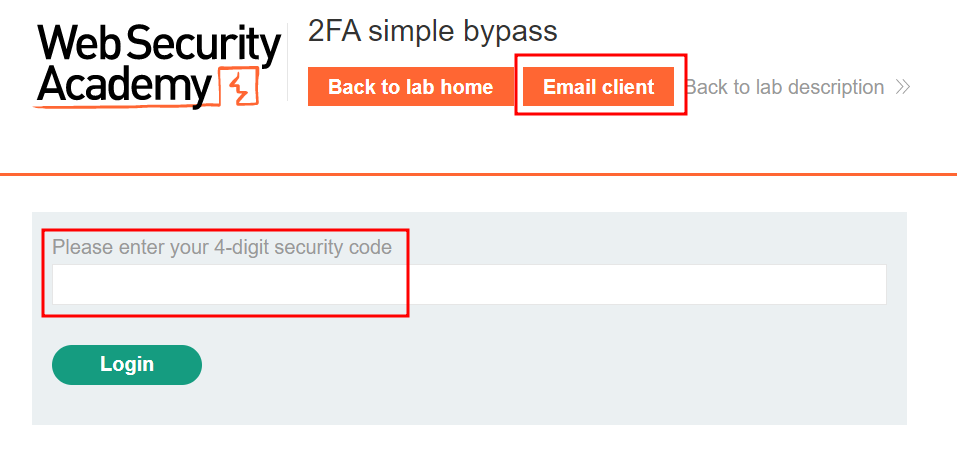
Click Email client to open email and get the 4 digit OTP
Paste the OTP in the field box & click Log in
During a test, authentication as ‘carlos’ with the correct password led to a 2FA prompt, but the code was inaccessible. By directly navigating to the expected post-login URL (/my-account) after initial password verification, the 2FA check was successfully bypassed. This indicates that the system’s session is prematurely established upon first-factor authentication, allowing direct access to protected resources despite pending 2FA.
LAB 3 - Password reset broken logic
Lab Description :
Solution :
We are presented with a blog page where on top we have a Email client functionality & also a link to My Account page.
In the login page, there is the Forgot password functionality.Click on forgot password
Clicking on forgot password takes us to this page where we have to enter your username or email to reset our password. I enter username wiener
Reset link sent to acccount
Submit new password and intercept it through burp:
After intercepting the above request, we found that leaving the token value blank still allowed redirection, indicating no backend validation. By changing the username to carlos, we could log in and solve the lab.
Lets try logging in as carlos with the password which we used for reset - newpassword